
Reversing the FT100 BLE Fitness Bracelet
The device
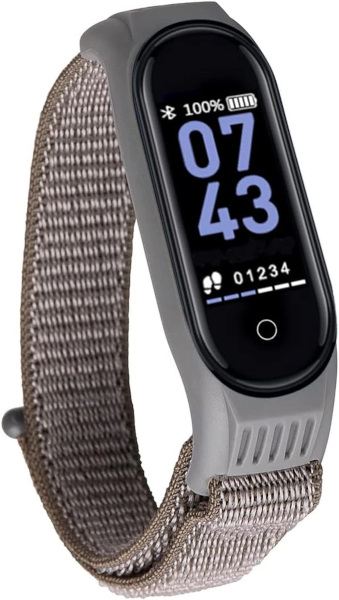
The device is called FT100 Fitness Bracelet by TWENTYFIVESEVEN and it offers some basic features such as heart rate and blood pressure monitoring, step count, music control, notifications handling, a find device functionality, and OTA firmware update.
It features a display and a soft touch button, and it is possible to use the manufacturer’s app to configure the device via BLE connection.
 |
|---|
| FT100 Fitness Bracelet |
The watch features a PHY6202 MCU, 512Kb of ROM, 16Kb of RAM and a whopping 50mAh battery (that I promptly swapped with an external power supply as it was giving me troubles).
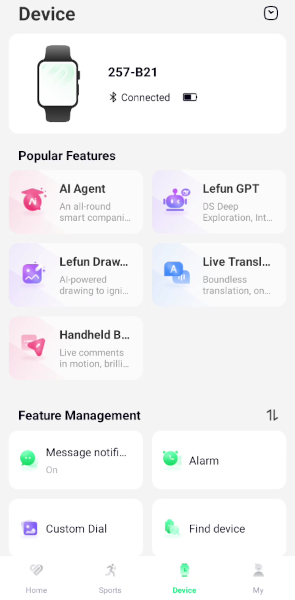
The companion app Lefun Health allows interaction with device’s functionalities. It offers “data aggregation” features such as recording sport activity or sleep quality. The app itself works ok-ish but it has frequent ads, it often asks for additional permissions and it tries to push to users some unrelated AI services made by Lefun. It’s not my favorite app, but it is good enough to work with.
 |
|---|
| Lefun App |
What I’ll do in this article is try to instrument the android companion app to access BLE traffic between smartphone and our smartwatch to attempt reverse engineering the communication.
Sniffing the BLE traffic with frida
In order to target the functionalities on the FT100 it is necessary to gain visibility of the BLE traffic exchanged between the phone and the bracelet. So we need to work toward that.
To be completely fair, there are multiple ways that could be used to dump the BLE traffic in this exact situation, with android HCI Snoop log being my usual choice. However I’ve been working on mobile applications a lot more recently, I’ve recently checked out this article which uses a similar technique and I figured this project would be a nice way to get practice working with frida, so I decided to go for this way.
This method could also come in handy when working on a non-rooted android device as usually there is no access to HCI logs, and a frida gadget could be patched into the apk, bypassing the need for root access.
The first step here would be to perform a static analysis of the apk. Using jadx I decompiled the apk and started digging for clues on the right point to hook into.
During static analysis, the obvious first attempt was to look for and attempt hooking android default functions to handle BLE GATT events in BluetoothGattCallback class. Ideally we would need at least access to onCharacteristicChanged() and onCharacteristicWrite() to intercept characteristic writes and GATT notifications traffic. But simply hooking these functions I was only able to intercept traffic for writes.
After further analysis I realized the app was not using the base Android BluetoothGattCallback, but instead some of these functions would be overridden by anonymous classes. So I needed to reliably hook the override implementations used at runtime in order to access incoming data.
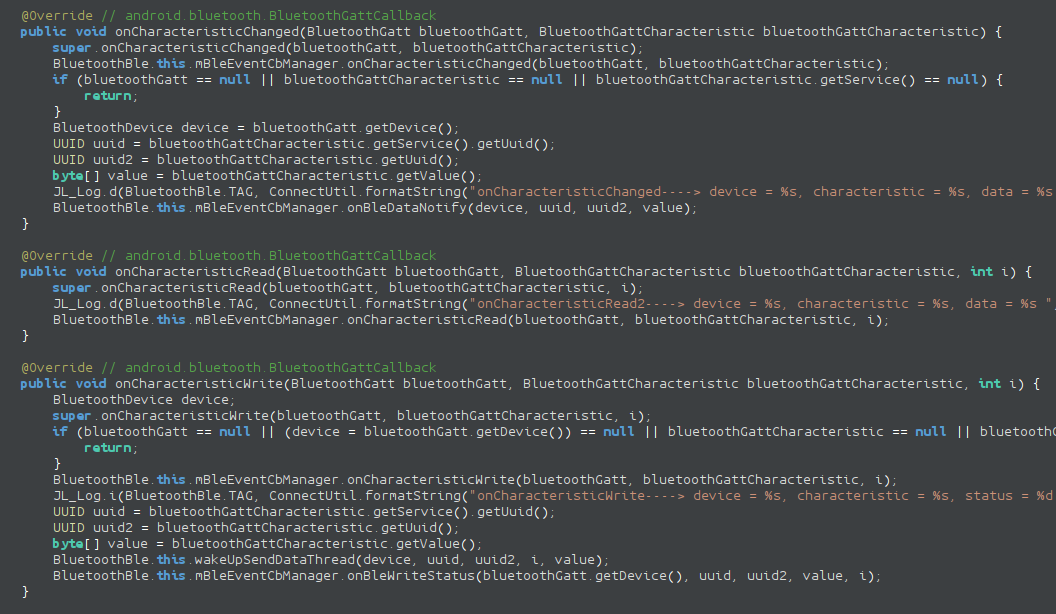
The turning point was identifying BluetoothDevice.connectGatt() as the universal entry point for every BLE connection. This method always receives the actual callback instance as an argument. By hooking all overloads of connectGatt() and dynamically extracting the runtime callback class (callback.$className), it became possible to hook the correct implementation of the target functions regardless of anonymous inner classes as observed in jadx.
var BluetoothDevice = Java.use("android.bluetooth.BluetoothDevice");

    var hookedCallbacks = {};

    BluetoothDevice.connectGatt.overloads.forEach(function (overload) {

        overload.implementation = function () {

            logSection("connectGatt intercepted");

            for (var i = 0; i < arguments.length; i++) {
                console.log("arg[" + i + "] = " + arguments[i]);
            }

            // Callback is always argument index 2 in all overloads
            var callback = arguments[2];

            if (callback) {

                var className = callback.$className;
                console.log("[+] Real callback class: " + className);

                hookGattCallback(className);
            }

            return overload.apply(this, arguments);
        };
    });
Then inside the hookGattCallback function each interesting function can be hooked explicitly like this:
if (Callback.onCharacteristicChanged) {
                Callback.onCharacteristicChanged
                    .overload(
                        "android.bluetooth.BluetoothGatt",
                        "android.bluetooth.BluetoothGattCharacteristic"
                    )
                    .implementation = function (gatt, characteristic) {

                        var value = characteristic.getValue();

                        logSection("BLE RX (Notification)");
                        console.log("Device : " + gatt.getDevice().getAddress());
                        console.log("Service: " + characteristic.getService().getUuid());
                        console.log("Char   : " + characteristic.getUuid());
                        console.log("Data   : " + bytesToHex(value));
                        console.log("ASCII  : " + bytesToAscii(value));

                        return this.onCharacteristicChanged(gatt, characteristic);
                    };
            }
With this method it was possible to achieve full visibility over the BLE events including characteristic read and writes, as well as notifications. Now it’s time to analyze the protocol.
GATT traffic overview
We can now check out the extracted data from the frida hooks and having access to GATT level operations, we can start digging into the protocol. Now, if you’ve worked with BLE before you will surely know GATT in more or less details, but if you don’t, feel free to check out this post on solving BLE CTF on esp32 I go through basics there.
For the sake of clarity, let’s explicit that the stack we are working with looks something like this:
App protocol
     ↓
GATT characteristic
     ↓
ATT packets
     ↓
BLE link
For the scope of the article, we may as well just consider App protocol and GATT characteristics.
Picking out a few messages we can start figuring out what’s going on under the hood:
======================================
BLE WRITE (TX)
======================================
Service: 000018d0-0000-1000-8000-00805f9b34fb
Char   : 00002d01-0000-1000-8000-00805f9b34fb
Data   : ab 05 31 01 bf
ASCII  : ..1..

======================================
BLE WRITE ACK
======================================
Status : 0

======================================
BLE WRITE (TX)
======================================
Service: 000018d0-0000-1000-8000-00805f9b34fb
Char   : 00002d01-0000-1000-8000-00805f9b34fb
Data   : ab 05 06 00 a2
ASCII  : .....

======================================
BLE WRITE ACK
======================================
Status : 0

======================================
BLE RX (Notification)
======================================
Device : C0:00:A1:A2:1F:04
Service: 000018d0-0000-1000-8000-00805f9b34fb
Char   : 00002d00-0000-1000-8000-00805f9b34fb
Data   : 5a 09 06 00 00 a0 32 14 79 00 00 00 00 00 00 00 00 00 00 00
ASCII  : Z.....2.y...........
From these few exchanges we can already tell a few things about the protocol: first off the protocol lives on top of service 000018d0-0000-1000-8000-00805f9b34fb which doesn’t appear to be a standard GATT service.
The app writes on char 00002d01-0000-1000-8000-00805f9b34fb (handle 0x002b) and the BLE notifications from the smart band are received on char 00002d00-0000-1000-8000-00805f9b34fb (handle 0x002e).
We can also see that some commands from the app trigger a response from the device through a BLE notification, and some other don’t.
In order to understand the semantics of the protocol, we need to observe some more traffic.
For brevity, char writes by the app will be marked as TX, while BLE notifications from the smartband will be marked with RX.
[TX] AB 05 56 01 8B
[TX] AB 05 E0 01 23
[TX] AB 0A 39 00 01 02 D0 06 40 23
[TX] AB 05 51 00 BB
[TX] AB 05 31 01 BF
[TX] AB 05 06 00 A2
[RX] 5A 09 06 00 00 A0 32 14 79 00 00 00 00 00 00 00 00 00 00 00
[TX] AB 04 00 0C
[RX] 5A 14 00 FF 27 14 F1 50 31 39 02 01 02 32 19 54 4A 44 50 16
[TX] AB 04 03 EE
[RX] 5A 05 03 23 62 00 00 00 00 00 00 00 00 00 00 00 00 00 00 00
[TX] AB 04 70 F4
[TX] AB 05 22 00 58
[RX] 5A 07 22 00 1F FF 06 00 00 00 00 00 00 00 00 00 00 00 00 00
Messages are tagged with an header depending on the direction of the communications, char writes from phone to device always have 0xAB header, while notifications have a 0x5A header. Additionally notifications always seem to be padded to 20 bytes (padding with zeros).
The other bytes seem to have a straightforward meaning as well, the second byte is in fact the length of the message, while the third and fourth bytes seem to be command bytes (CMD, SUB-CMD).
Reversing the protocol
Now, we could start black box reversing from these messages, but it would be pretty hard to make progress, both because some messages don’t produce an observable result and because payloads and message sending is out of our control. It would be wise to start somewhere simpler and more controlled.
Find my device
From the app, it is possible to use the find my device functionality to have the smarband buzz three times to help the owner find it. This functionality seems straightforward, so for the time being, we can ignore other messages and we can try to intercept the find my device messages only:
======================================
BLE WRITE (TX)
======================================
Service: 000018d0-0000-1000-8000-00805f9b34fb
Char   : 00002d01-0000-1000-8000-00805f9b34fb
Data   : ab 04 09 90
ASCII  : ....

======================================
BLE WRITE ACK
======================================
Status : 0

======================================
BLE RX (Notification)
======================================
Device : C0:00:A1:A2:1F:04
Service: 000018d0-0000-1000-8000-00805f9b34fb
Char   : 00002d00-0000-1000-8000-00805f9b34fb
Data   : 5a 05 09 01 1a 00 00 00 00 00 00 00 00 00 00 00 00 00 00 00
ASCII  : Z...................
We see that the smartphone app writes payload ab 04 09 90 on the target service characteristic, it triggers the find my device behavior on the smartband.
Surely enough, if we try on our own, connect to the smartwatch and write on characteristic 00002d01-0000-1000-8000-00805f9b34fb the value ab 04 09 90 we can trigger device vibration.
This can be done quite simply with gatttool -b [MAC] --char-write-req -a 0x002c -n ab040990. (gatttool is technically deprecated, but I was having issues with pairing using bluetoothctl, so I figured it would be alright for quick testing).
NOTE: I wish I had a GIF of the device reacting to the command, but as I’m writing this article I just broke the device screen. My bad.
This was fun, but let’s dig deeper.
Notification handling
We can move on and reverse engineer how smartphone notifications are forwarded to the device. We can trigger android notifications on the smartphone and have the Lefun app relay the notification to the smartband to observe the payloads.
======================================
BLE WRITE (TX)
======================================
Service: 000018d0-0000-1000-8000-00805f9b34fb
Char   : 00002d01-0000-1000-8000-00805f9b34fb
Data   : ab 12 17 14 01 01 01 74 65 73 74 3a 20 74 65 73 74 67
ASCII  : .......test: testg
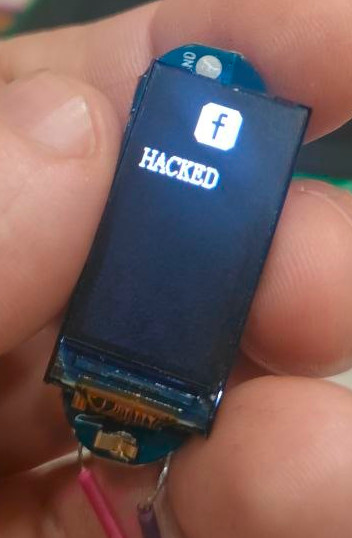
For this test, the notification is a whatsapp notification and the text shown on the screen is: test: test.
We can see from the logs of our instrumented app that we see ab121714010101746573743a207465737467 payload written to the characteristic with handle 0x2c. By converting it in ASCII we can see that the text payload is shared in cleartext as 746573743a2074657374 is the hex for ASCII test: test. Last byte looks suspicious and I’m sure it’s some kind of CRC, but we will figure this out later.
Based on what we know, we can make an educated guess and suppose that the base message frame looks something like this:
| Offset | Field | Note |
|---|---|---|
| 0 | Header | 0xAB (phone to device) |
| 1 | Length | Length of the message |
| 2 | Command ID | In case it is a 0x5A message, it mirrors the command byte |
| n..m | Payload | Command payload (optional) |
| last | CRC | ? |
This fits both the notification message format and the find device message format.
Now, we can replay our notification countless time, but can we modify it? If we change the ASCII payload, we see that the smart band doesn’t react to the message anymore even adjusting the length byte. And just like that, now it’s the perfect time to figure out the CRC.
So we attempt using reveng to understand which CRC we are working with and surely enough it gives us a result:
./reveng -w 8 -s ab121714010101746573743a207465737467
width=8 poly=0x31 init=0x00 refin=true refout=true xorout=0x00 check=0xa1 residue=0x00 name="CRC-8/MAXIM-DOW"
Now, it is possible to implement the function to calculate the CRC and we can start creating valid messages.
Minding the CRC and the length byte, we can generate our own notifications commands to send to the device.
 |
|---|
| Custom notification |
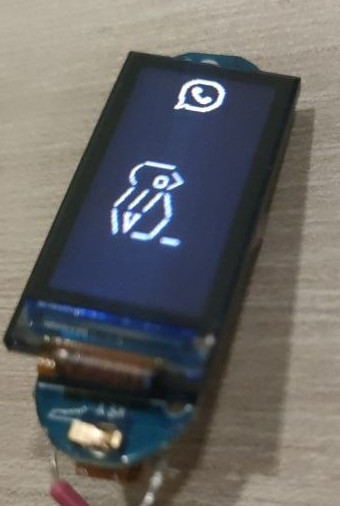
Only one last step is missing for full notification handling as we know the longest payload we can send on the exchanged MTU is 20 bytes. Now, if we remove, header, length, command ID and CRC bytes we are left with 16 bytes for the notification text, which is not much… Also we kind of figured out the packet format, but it doesn’t account for every byte in notification messages. It would make sense for there to be one or more bytes to handle some type of data fragmentation, to handle payloads longer than 16 bytes.
So I’ve sent a dozen of notifications to the smartwatch using the phone and I was able to figure the notification message format out almost entirely: As anticipated we confirm we have a fragmentation mechanism, in particular 2 extra bytes that specify the total fragment number and the current fragment. Then by experimenting I figured out two more bytes that are part of the notification message format which I called sub-command and extra bytes.
 |
|---|
| Fragmented custom notification |
The sub-command byte specifies the notification icon that will be shown on the smart band screen.
By creating and sending notification messages to the device, it was possible to compile a list of sub-commands and their respective notification type.
| Code | Icon |
|---|---|
| 1 | Call |
| 2/3 | SMS |
| 4 | Snapchat |
| 5/6/7 | SMS |
| 8 | SMS (style 2) |
| 16/17 | |
| 18 | |
| 19 | |
| 20 | |
| 21 | Line |
| 22 | Talk |
| 23 | Facebook messenger |
| 24 | |
| 25 | WhatsApp Business |
Some icons appear on the FT100 for multiple sub-command values. This might be due to the fact that not all the supported notification types have a dedicated icon, but I’m just guessing.
To this day I’m not sure what the extra byte is there for. Sometimes it gets printed as a normal character, sometimes it doesn’t.
The notification message format is completely reconstructed as follow:
| Offset | Field | Note |
|---|---|---|
| 0 | Header | 0xAB (phone to device) |
| 1 | Length | Length of the message |
| 2 | Command ID | 0x17 |
| 3 | Sub-command | |
| 4 | Total Fragments | Total number of fragment for messages longer than 20 bytes |
| 5 | Fragment Index | |
| 6 | Extra | |
| n..m | Payload | ASCII data |
| last | CRC8 | CRC-8/MAXIM-DOW |
Finally, whenever I see fragmentation I have to try and mess with it a little bit and I noticed a weird behavior. Fragment indexes are 1 based, and the device starts buffering fragments at index 1 as expected, however, if a second message sets fragment index = 1, the first chunk of buffered message gets overwritten. The funny part is that fragment 1 is the only one that shows this behavior. Fragments with indexes greater than 1 will be buffered in order of arrival (and not depending on the frame number) until one message with fragment index = total fragments is written on the target characteristic, again not dependent on the actual number of frames received.
Weather data push
Just because there’s way too much stuff to ignore it all, I wanted to reverse engineer another message type: weather data push. I’m not sure if this happens periodically while using the app, but it is possible to trigger a manual weather data push in the app, so it was kind of easy to experiment with this feature as well.
For the first time, the menu item for this functionality appears on the device only if a weather push has been performed before.
======================================
BLE WRITE (TX)
======================================
Service: 000018d0-0000-1000-8000-00805f9b34fb
Char   : 00002d01-0000-1000-8000-00805f9b34fb
Data   : ab 08 2a 00 08 0f 05 28
ASCII  : . . . . . . . . (

======================================
BLE WRITE ACK
======================================
Status : 0

======================================
BLE RX (Notification)
======================================
Device : C0:00:A1:A2:1F:04
Service: 000018d0-0000-1000-8000-00805f9b34fb
Char   : 00002d00-0000-1000-8000-00805f9b34fb
Data   : 5a 05 2a 01 8e 00 00 00 00 00 00 00 00 00 00 00 00 00 00 00
ASCII  : Z...................
Again, I’ve sent a few of these messages and figured out the packet format:
| Offset | Field | Note |
|---|---|---|
| 0 | Header | 0xAB (phone to device) |
| 1 | Length | Length of the message |
| 2 | Command ID | 0x2A |
| 3 | Sub-command | |
| 4 | Extra | |
| 5 | Max Temp | Maximum temperature value |
| 6 | Min Temp | Minimum temperature value |
| last | CRC8 | CRC-8/MAXIM-DOW |
Sub-command values in this case change the weather icon shown in the weather menu. Values in this case are:
| Code | Icon |
|---|---|
| 0 | Sun |
| 1 | Cloud + Sun |
| 2 | Rain |
| 3 | Snow |
| 4 | Cloud |
Any other value will default to cloud icon.
Here too, no image of the smartwatch because I broke the screen, it sucks I know.
Watchface data push
I meant to keep the analysis of this feature for a part 2 of the article, but as the screen is now broken I figured it was worth wrapping up what I have done to this point.
After identifying several control commands, I wanted to understand how the companion app uploads custom watchfaces to the device. Capturing a full update revealed that the process consists of two distinct phases: a short control exchange that prepares the watch for the transfer, followed by a large stream of fragmented image data.
The actual watchface image is transmitted as a sequence of packets written on the same BLE characteristic used for other commands. Unlike the notification and weather packets analyzed earlier, these frames do not include a length byte. Instead, they are simple fragments of raw pixel data indexed with a 16-bit counter. The start of image stream is probably set up by previous communications.
Typical fragments look like this:
======================================
BLE WRITE (TX)
======================================
Service: 000018d0-0000-1000-8000-00805f9b34fb
Char   : 00002d01-0000-1000-8000-00805f9b34fb
Data   : ab 2c 00 00 79 ce 00 00 08 42 c7 39 e7 39 c7 39 08 42 c7 39
ASCII  : .,..y....B.9.9.9.B.9

======================================
BLE WRITE ACK
======================================
Status : 0

======================================
BLE WRITE (TX)
======================================
Service: 000018d0-0000-1000-8000-00805f9b34fb
Char   : 00002d01-0000-1000-8000-00805f9b34fb
Data   : ab 2c 00 01 c7 39 e7 39 e7 39 a6 31 e8 41 a6 31 c7 39 e7 39
ASCII  : .,...9.9.9.1.A.1.9.9

======================================
BLE WRITE ACK
======================================
Status : 0

======================================
BLE WRITE (TX)
======================================
Service: 000018d0-0000-1000-8000-00805f9b34fb
Char   : 00002d01-0000-1000-8000-00805f9b34fb
Data   : ab 2c 00 02 c7 39 e7 39 c7 39 08 42 21 08 e3 18 86 31 04 21
ASCII  : .,...9.9.9.B!....1.!

======================================
BLE WRITE ACK
======================================
Status : 0

======================================
By analyzing multiple captures it becomes clear that these packets implement a simple fragmentation scheme.
| Offset | Field | Note |
|---|---|---|
| 0 | Header | 0xAB (phone to device) |
| 1 | Command ID | 0x2C |
| 2 | Index (MSB) | Fragment index high byte |
| 3 | Index (LSB) | Fragment index low byte |
| 4..n | Payload | Raw image data |
| last | CRC8 | CRC-8/MAXIM-DOW |
The index field increments sequentially for each fragment, allowing the watch to reconstruct the full image stream.
Once all fragments are concatenated in order, the resulting byte stream contains nothing but pixel data. Now, it was easy to determine how images were sent, but it took a lot of fiddling to make sense of the data.
There are still two unknowns:
- Data format
- Image size
What I did was use an “easy to debug with” image, I decided to go for a numbered chess board.
I then captured the traffic when performing the upload operation, wrote a small parser that extracts 0xAB 0x2C packets from the BLE dump, sorts them by fragment index, and rebuilds the binary stream. I then tried using different image encoding formats to interpret the payload. I was eventually able to determine that the correct one was RGB565. I focused on common color encodings used in embedded displays, and the payload started to make sense when decoded this way.
Finding out the image size took longer to figure out as at first it wasn’t clear if or how metadata was included in the extracted binary blob. After a few attempts and a couple of hours spent staring at badly distorted images, it was possible to understand that the size is 80 x 160 pixel.
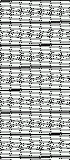 |
|---|
| Badly reconstructed image |
The correctly extracted watchface image looks like this:
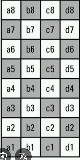 |
|---|
| Reconstructed image |
This fragmentation approach is fairly typical for BLE devices: instead of relying on large MTU sizes, the application simply slices the image into fixed-size chunks and transmits them sequentially. The watch then reassembles the data internally before updating the displayed watchface.
Now that the format of the watchface stream is understood, the next logical step would be to reproduce the process in reverse, however, I didn’t get to achieve this as I broke the watch.
Response message format
While we are at it we might as well formalize the response format, which looks something like this:
| Offset | Field | Note |
|---|---|---|
| 0 | Header | 0x5A (device to phone) |
| 1 | Length | Length of the message |
| 2 | Command ID | Reflected from the message the device is responding to |
| n..m | Payload | |
| last | CRC8 | CRC-8/MAXIM-DOW |
With the payload being either a status code (0x01 positive outcome, 0x00 negative outcome) or a returned value.
Conclusions
As I’m finishing this article, I’ve found a bunch of interesting classes that could help for future reversing efforts, namely com.tjd.lefun.sdk.ble.BleWatchServiceImpl and com.tjd.lefun.sdk.ble.WristbandCommandByte these classes explain quite well message formats and what operations the SDK supports, however many commands are not implemented in the app or in the smartband as I’ve forging messages for a few of those and got no response from the smartband.
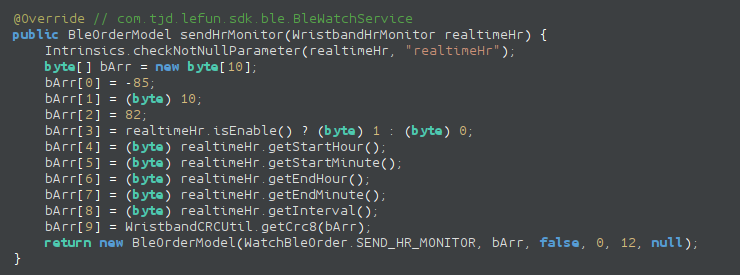 |
|---|
| App code handling notifications |
This would have saved me some frustration reversing the protocol, but it is what it is. It might be useful for future work.
All relevant scripts and resources are available here: https://github.com/0xless/FT100_fitness_bracelet_reversing